Inside LabRats
Entries retain the detail you recorded.
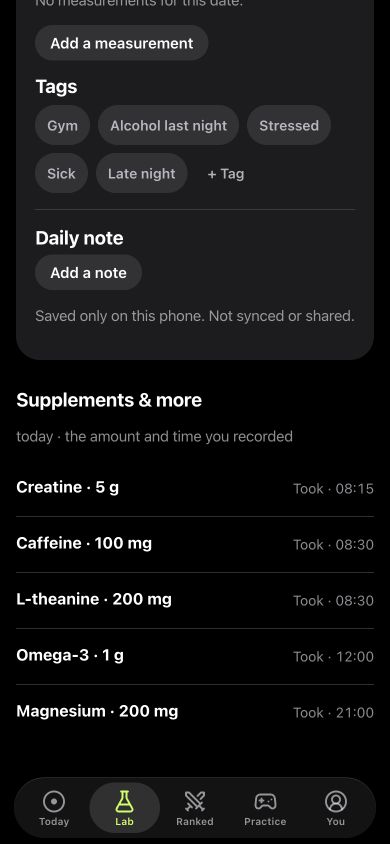
This scrolled Journal view keeps names, amounts and times visible beside daily tags and notes. Those fields make an entry easier to interpret later.
The displayed products and amounts belong to the fictional demo. They illustrate the log fields, not a suggested stack.
How to log supplements in LabRats
- Open Lab, tap Add to your day and choose Supplement.
- Enter your product name, amount and unit, then record when it happened.
- Use I took it or I stopped taking it to describe the entry.
- Save it and open your Journal to revisit the day.
The same custom-name entry supports a nootropic log or a peptide tracking journal. The app records the information you enter.
What belongs in your record?
Use the product name you actually recognise. When you make an entry, keep the amount and unit explicit if you record them, and use the date and time that match what happened. A note can explain an unusual day without turning it into a new score.
Keep other context alongside the log: sleep, energy, mood, interruptions and changes in your routine. A product entry alone cannot describe the whole day. LabRats also supports your own Journal notes, tags and measurements.
A log and an experiment answer different questions
A log answers “What did I record?” A planned comparison asks “How did selected results differ across the days I defined?” Start with the log if you simply want a reliable history. Use a personal experiment when you have a specific question and a schedule you can interpret.
Entry → context → saved task result
Keep each part visible. A note about a difficult night can matter when you later read a slow reaction-time run.
When you have a question to compare, the personal experiment guide shows how the schedule and selected games fit together.
Follow measurements, not a general feeling of progress
Choose game results that match your question. Reaction time has a time unit. A sequence task has a sequence length. A task with distractions has errors and timing to consider. An average score can conceal those differences.
In LabRats, personal experiments compare selected game measurements where enough compatible observations are available. An unclear result is useful information about the record; it is not a reason to keep rerunning the game until it looks favourable.
Start with reaction time in milliseconds, a memory task or attention timing and errors according to the observation you want to follow.
Keep the interpretation narrow
If results differ on logged and unlogged days, other things may differ too. Practice, expectations, changing schedules and missing entries can all complicate the comparison. A missing log should not silently become proof that nothing was taken.
LabRats does not recommend products, doses or schedules, and it does not establish that a supplement is effective or safe. Keep treatment decisions with an appropriate professional. The purpose here is a clearer personal record, including observations that do not support your original expectation.
Your Journal, your sharing choices
Core local play and the Journal can be used without an account. Account sync and online features are optional. Shared Labs are a separate group experience; read the privacy policy and the in-app sharing controls before choosing what to share.