Inside LabRats
The catalogue is part of the real app.
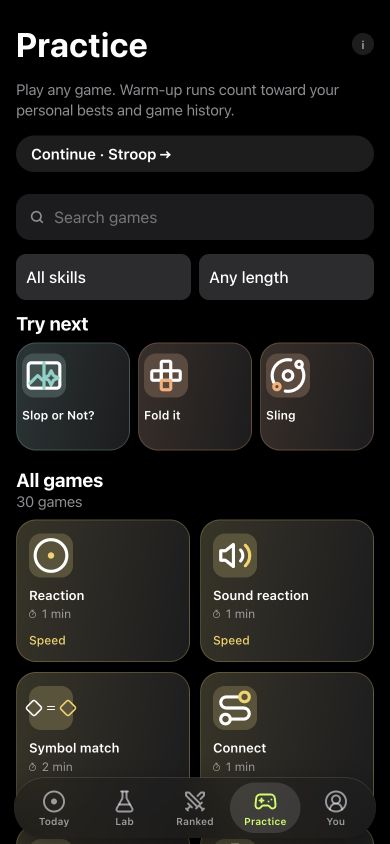
Practice includes search, skill and duration filters, plus a count of the available games. The screenshot shows the actual catalogue interface.
You can choose a short task for repeated tracking without committing to the whole catalogue. A personal experiment uses the games you select for that question.
Find a game that fits your question
Use Practice’s search, skill and duration filters to explore the catalogue. Start with Reaction for response timing, Digit span or Corsi for sequences, or Stroop and Go/No-Go for attention demands.
Complete the run, then revisit its saved result in You. You can keep playing for the game itself or choose selected games for a planned comparison.
Choose a task, not just a category
Reaction asks you to respond to a light. Digit span asks you to retain a sequence. Corsi blocks uses spatial positions. Stroop introduces competing information. These games do different things, so a result is most useful when you keep the task in view.
Practice lets you explore the catalogue. A personal experiment lets you choose games for a question you want to follow. The app keeps compatible results together when it draws comparisons.
What you can do in LabRats
- Practice: explore short games and revisit saved runs.
- Personal trends: follow results across days.
- Journal: keep your own notes, logs, tags and measurements.
- Personal experiments: plan a comparison and read selected game measurements.
- Ranked: play online duels using the same seeded challenge as an opponent.
- Shared Labs: join a group space with shared challenges and conversation.
Some features require an account or Premium. The app shows current access limits and prices before purchase. Core local play and the Journal work without an account; online competition requires a connection.
The Journal accepts your own names for nootropics, peptides and supplements, so the context can stay alongside the games you play.
Does brain training improve intelligence?
LabRats makes no promise to increase intelligence or transfer game practice into everyday performance. If you get better at one game, that is evidence of better performance on that game. It does not by itself answer a broader question about cognition.
The useful feature is a record you can revisit: how you played, which measurements changed and what context you recorded. Errors, slower runs and unclear comparisons are part of that record.
A practical first week
Begin by learning the instructions for a small selection of games. Repeat them on later days using the same phone. Keep a short note about anything unusual, and review the series after you have several observations instead of chasing a high score after each run.
If you are interested in a routine or supplement question, use the Journal first. Set up a personal experiment once you can state the comparison and choose the task measurements it needs. There is no need to play all 30 games to answer one narrow question.
Find the right starting point
Use the reaction guide if timing is your main interest, the memory guide to compare sequence and updating tasks, or the attention guide for timing and errors under competing demands. The method page explains how LabRats treats comparisons and their limits.